

Generate PDF
Directus Flow operation that generates PDF files from JSON templates using pdfme.
Flow Operation
Features
- Generic
pdfmetemplate rendering from JSON template.basePdfis the source of truth for page size and margins- Optional full-page backgrounds through a single
background_imagevalue - Output to Directus Files or raw base64 response
- Dot notation support in schema names, for example
user.first_name - Built-in local
Roboto-Boldregistration fromfonts/Roboto-Bold.ttf - Built-in plugins for text, images, shapes, dates, form controls, tables, and barcodes
Installation
Local extension:
cd extensions/directus-extension-generate-pdf
npm install
Then restart Directus so it reloads the extension.
To rebuild the published extension files after changing src/:
npm run build
Operation
- Extension package:
@cesarechazu/directus-extension-generate-pdf - Operation ID:
generate-pdf-operation - Display name:
Generate PDF
Inputs
template:pdfmetemplate objectinputs: object or array of objects used by template fieldsgenerate_options: optional object passed topdfme.generate()background_image: optional image source used as full-page background. Acceptsdata:image/..., a same-host/assets/<file_id>URL, or a Directus file IDfilename: output filenametitle: Directus file titlestorage: Directus storage adapterfolder: optional Directus folderstore_file: store the PDF in Directus Files, defaults totruereturn_base64: include PDF base64 in the operation response, defaults tofalse
Response
file_id: Directus file ID when the PDF is storedfilename: generated filenametitle: Directus file title used for the stored assetstorage: Directus storage adapter used for the outputstored: whether the PDF was uploaded to Directus Filesfolder: Directus folder ID when providedasset_url: asset URL when the file was stored andPUBLIC_URLis configuredmime_type: alwaysapplication/pdfbytes: generated PDF size in bytespages: number of generated pages (based oninputs)warnings: non-fatal warnings collected during generationbase64: optional PDF base64 whenreturn_base64istrue
Supported Schema Types
- Text:
text,multiVariableText - Media:
image,svg - Layout and shapes:
table,line,rectangle,ellipse - Date and time:
dateTime,date,time - Form controls:
select,radioGroup,checkbox - Barcodes:
qrcode,japanpost,ean13,ean8,code39,code128,nw7,itf14,upca,upce,gs1datamatrix,pdf417
Notes
- Page size and margins must be defined in
template.basePdf. - This operation does not override page size or margins with separate fields.
generate_optionsis for PDF metadata, color mode, and fonts. It does not control page size, margins, or schema positions.background_imageacceptsdata:image/..., a URL on the same host as DirectusPUBLIC_URLunder/assets/, or a Directus file ID (recommended).- URLs on other hosts are rejected. In this version, external background images must be uploaded to Directus first and then referenced by asset URL or file ID.
- Background images are validated as supported image files (
png,jpeg,webp,gif) before being embedded. - If a background is provided and
basePdfis blank-object mode, it is inserted as a full-page static background. - If a schema name is
user.first_name, the operation can resolve it from nested input data such as{ "user": { "first_name": "John" } }.
Fonts
- Default fallback font is
Roboto. Roboto-Boldis auto-registered fromfonts/Roboto-Bold.ttfwhen the file is present.- You can still define custom fonts in
generate_options.font.
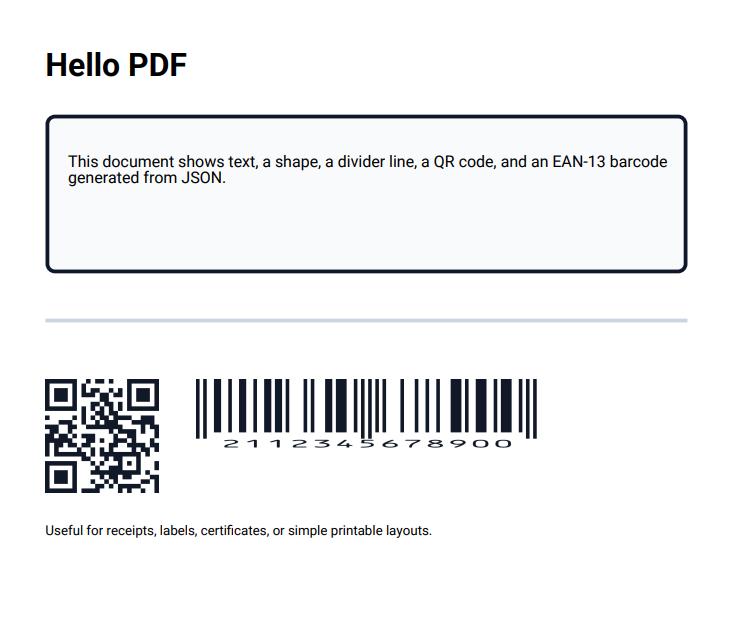
Hello PDF Example
Template:
{
  "basePdf": {
    "width": 210,
    "height": 297,
    "padding": [10, 10, 10, 10]
  },
  "schemas": [
    [
      {
        "name": "highlight_box",
        "type": "rectangle",
        "position": { "x": 20, "y": 42 },
        "width": 170,
        "height": 42,
        "borderWidth": 1,
        "borderColor": "#0F172A",
        "color": "#F8FAFC",
        "radius": 2
      },
      {
        "name": "title",
        "type": "text",
        "position": { "x": 20, "y": 24 },
        "width": 120,
        "height": 12,
        "fontSize": 24,
        "fontName": "Roboto-Bold"
      },
      {
        "name": "body",
        "type": "text",
        "position": { "x": 26, "y": 52 },
        "width": 170,
        "height": 24,
        "fontSize": 12
      },
      {
        "name": "separator",
        "type": "line",
        "position": { "x": 20, "y": 96 },
        "width": 170,
        "height": 1,
        "color": "#CBD5E1"
      },
      {
        "name": "qr_label",
        "type": "text",
        "position": { "x": 20, "y": 104 },
        "width": 30,
        "height": 6,
        "fontSize": 8,
        "content": "QR"
      },
      {
        "name": "qr_code",
        "type": "qrcode",
        "position": { "x": 20, "y": 112 },
        "width": 30,
        "height": 30,
        "content": "https://directus.io/docs",
        "backgroundColor": "#FFFFFF",
        "barColor": "#111827"
      },
      {
        "name": "ean_label",
        "type": "text",
        "position": { "x": 60, "y": 104 },
        "width": 90,
        "height": 6,
        "fontSize": 8,
        "content": "EAN-13"
      },
      {
        "name": "ean_code",
        "type": "ean13",
        "position": { "x": 60, "y": 112 },
        "width": 90,
        "height": 18,
        "content": "2112345678900",
        "backgroundColor": "#FFFFFF",
        "barColor": "#111827",
        "textColor": "#111827",
        "includetext": true
      },
      {
        "name": "footer",
        "type": "text",
        "position": { "x": 20, "y": 150 },
        "width": 170,
        "height": 10,
        "fontSize": 10
      }
    ]
  ]
}
Inputs:
{
  "title": "Hello PDF",
  "body": "This document shows text, a shape, a divider line, a QR code, and an EAN-13 barcode generated from JSON.",
  "qr_code": "https://directus.io/docs",
  "ean_code": "2112345678900",
  "footer": "Useful for receipts, labels, certificates, or simple printable layouts."
}
Example Result
Multi-page inputs:
[
  { "title": "Page 1", "body": "First page" },
  { "title": "Page 2", "body": "Second page" }
]
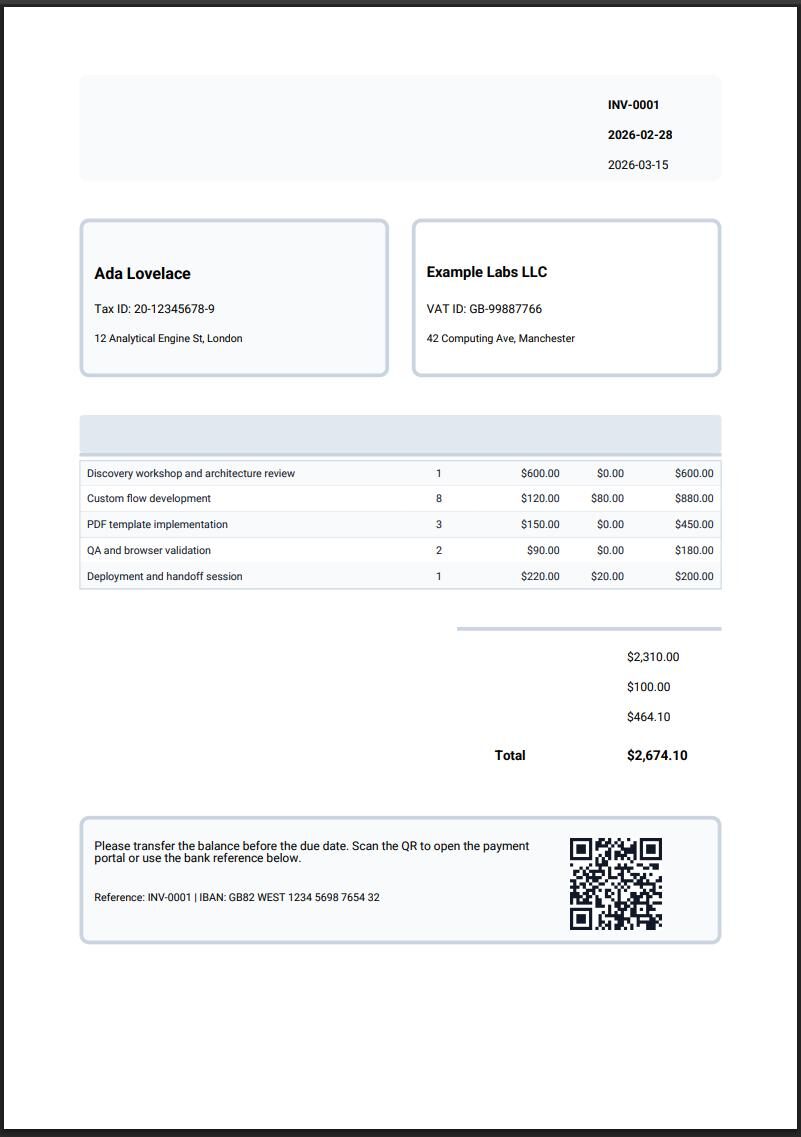
Invoice Example
Template:
Show Template JSON{
"basePdf": {
"width": 210,
"height": 297,
"padding": [10, 10, 10, 10]
},
"schemas": [
[
{
"name": "header_box",
"type": "rectangle",
"position": { "x": 20, "y": 18 },
"width": 170,
"height": 28,
"borderWidth": 0,
"borderColor": "#0F172A",
"color": "#F8FAFC",
"radius": 2
},
{
"name": "invoice_title",
"type": "text",
"position": { "x": 24, "y": 24 },
"width": 80,
"height": 12,
"fontSize": 22,
"fontName": "Roboto-Bold",
"content": "INVOICE"
},
{
"name": "company_name",
"type": "text",
"position": { "x": 24, "y": 34 },
"width": 70,
"height": 6,
"fontSize": 9,
"content": "Example Labs LLC"
},
{
"name": "invoice_number_label",
"type": "text",
"position": { "x": 132, "y": 24 },
"width": 25,
"height": 6,
"fontSize": 9,
"content": "Number"
},
{
"name": "invoice_number",
"type": "text",
"position": { "x": 160, "y": 24 },
"width": 30,
"height": 6,
"fontSize": 9,
"fontName": "Roboto-Bold"
},
{
"name": "issue_date_label",
"type": "text",
"position": { "x": 132, "y": 32 },
"width": 25,
"height": 6,
"fontSize": 9,
"content": "Date"
},
{
"name": "issue_date",
"type": "text",
"position": { "x": 160, "y": 32 },
"width": 25,
"height": 6,
"fontSize": 9,
"fontName": "Roboto-Bold"
},
{
"name": "due_date_label",
"type": "text",
"position": { "x": 132, "y": 40 },
"width": 25,
"height": 6,
"fontSize": 9,
"content": "Due"
},
{
"name": "due_date",
"type": "text",
"position": { "x": 160, "y": 40 },
"width": 25,
"height": 6,
"fontSize": 9
},
{
"name": "customer_box",
"type": "rectangle",
"position": { "x": 20, "y": 56 },
"width": 82,
"height": 42,
"borderWidth": 1,
"borderColor": "#CBD5E1",
"color": "#F8FAFC",
"radius": 2
},
{
"name": "seller_box",
"type": "rectangle",
"position": { "x": 108, "y": 56 },
"width": 82,
"height": 42,
"borderWidth": 1,
"borderColor": "#CBD5E1",
"color": "#FFFFFF",
"radius": 2
},
{
"name": "bill_to_label",
"type": "text",
"position": { "x": 24, "y": 60 },
"width": 30,
"height": 6,
"fontSize": 8,
"content": "Bill To"
},
{
"name": "customer_name",
"type": "text",
"position": { "x": 24, "y": 68 },
"width": 70,
"height": 8,
"fontSize": 12,
"fontName": "Roboto-Bold"
},
{
"name": "customer_tax_id",
"type": "text",
"position": { "x": 24, "y": 78 },
"width": 70,
"height": 6,
"fontSize": 9
},
{
"name": "customer_address",
"type": "text",
"position": { "x": 24, "y": 86 },
"width": 70,
"height": 8,
"fontSize": 8
},
{
"name": "from_label",
"type": "text",
"position": { "x": 112, "y": 60 },
"width": 20,
"height": 6,
"fontSize": 8,
"content": "From"
},
{
"name": "seller_name",
"type": "text",
"position": { "x": 112, "y": 68 },
"width": 70,
"height": 8,
"fontSize": 11,
"fontName": "Roboto-Bold"
},
{
"name": "seller_tax_id",
"type": "text",
"position": { "x": 112, "y": 78 },
"width": 70,
"height": 6,
"fontSize": 9
},
{
"name": "seller_address",
"type": "text",
"position": { "x": 112, "y": 86 },
"width": 70,
"height": 8,
"fontSize": 8
},
{
"name": "items_header_box",
"type": "rectangle",
"position": { "x": 20, "y": 108 },
"width": 170,
"height": 10,
"borderWidth": 0,
"borderColor": "#E2E8F0",
"color": "#E2E8F0",
"radius": 1
},
{
"name": "items_header_line",
"type": "line",
"position": { "x": 20, "y": 118 },
"width": 170,
"height": 1,
"color": "#CBD5E1"
},
{
"name": "description_header",
"type": "text",
"position": { "x": 24, "y": 111 },
"width": 78,
"height": 6,
"fontSize": 8,
"fontName": "Roboto-Bold",
"content": "Description"
},
{
"name": "qty_header",
"type": "text",
"position": { "x": 110, "y": 111 },
"width": 15,
"height": 6,
"fontSize": 8,
"fontName": "Roboto-Bold",
"content": "Qty"
},
{
"name": "price_header",
"type": "text",
"position": { "x": 130, "y": 111 },
"width": 20,
"height": 6,
"fontSize": 8,
"fontName": "Roboto-Bold",
"content": "Price"
},
{
"name": "discount_header",
"type": "text",
"position": { "x": 150, "y": 111 },
"width": 16,
"height": 6,
"fontSize": 8,
"fontName": "Roboto-Bold",
"content": "Disc."
},
{
"name": "total_header",
"type": "text",
"position": { "x": 170, "y": 111 },
"width": 18,
"height": 6,
"fontSize": 8,
"fontName": "Roboto-Bold",
"content": "Total"
},
{
"name": "invoice_items",
"type": "table",
"position": { "x": 20, "y": 120 },
"width": 170,
"height": 64,
"content": "[]",
"showHead": false,
"repeatHead": false,
"head": ["Description", "Qty", "Price", "Disc.", "Total"],
"headWidthPercentages": [50, 12, 14, 10, 14],
"tableStyles": {
"borderColor": "#CBD5E1",
"borderWidth": 0.2
},
"headStyles": {
"fontName": "Roboto-Bold",
"alignment": "left",
"verticalAlignment": "middle",
"fontSize": 8,
"lineHeight": 1,
"characterSpacing": 0,
"fontColor": "#0F172A",
"backgroundColor": "#E2E8F0",
"borderColor": "#CBD5E1",
"borderWidth": { "top": 0, "right": 0, "bottom": 0, "left": 0 },
"padding": { "top": 2, "right": 2, "bottom": 2, "left": 2 }
},
"bodyStyles": {
"fontName": "Roboto",
"alignment": "left",
"verticalAlignment": "middle",
"fontSize": 8,
"lineHeight": 1,
"characterSpacing": 0,
"fontColor": "#111827",
"backgroundColor": "#FFFFFF",
"alternateBackgroundColor": "#F8FAFC",
"borderColor": "#E2E8F0",
"borderWidth": { "top": 0, "right": 0, "bottom": 0.1, "left": 0 },
"padding": { "top": 2, "right": 2, "bottom": 2, "left": 2 }
},
"columnStyles": {
"alignment": {
"1": "center",
"2": "right",
"3": "right",
"4": "right"
}
}
},
{
"name": "totals_line",
"type": "line",
"position": { "x": 120, "y": 194 },
"width": 70,
"height": 1,
"color": "#CBD5E1"
},
{
"name": "subtotal_label",
"type": "text",
"position": { "x": 130, "y": 200 },
"width": 30,
"height": 6,
"fontSize": 9,
"content": "Subtotal"
},
{
"name": "subtotal",
"type": "text",
"position": { "x": 165, "y": 200 },
"width": 25,
"height": 6,
"fontSize": 9
},
{
"name": "discount_total_label",
"type": "text",
"position": { "x": 130, "y": 208 },
"width": 30,
"height": 6,
"fontSize": 9,
"content": "Discount"
},
{
"name": "discount_total",
"type": "text",
"position": { "x": 165, "y": 208 },
"width": 25,
"height": 6,
"fontSize": 9
},
{
"name": "tax_label",
"type": "text",
"position": { "x": 130, "y": 216 },
"width": 30,
"height": 6,
"fontSize": 9,
"content": "Tax"
},
{
"name": "tax",
"type": "text",
"position": { "x": 165, "y": 216 },
"width": 25,
"height": 6,
"fontSize": 9
},
{
"name": "total_label",
"type": "text",
"position": { "x": 130, "y": 226 },
"width": 30,
"height": 7,
"fontSize": 10,
"fontName": "Roboto-Bold"
},
{
"name": "total",
"type": "text",
"position": { "x": 165, "y": 226 },
"width": 25,
"height": 7,
"fontSize": 10,
"fontName": "Roboto-Bold"
},
{
"name": "payment_box",
"type": "rectangle",
"position": { "x": 20, "y": 244 },
"width": 170,
"height": 34,
"borderWidth": 1,
"borderColor": "#CBD5E1",
"color": "#F8FAFC",
"radius": 2
},
{
"name": "payment_note",
"type": "text",
"position": { "x": 24, "y": 250 },
"width": 116,
"height": 12,
"fontSize": 9
},
{
"name": "bank_reference",
"type": "text",
"position": { "x": 24, "y": 264 },
"width": 116,
"height": 8,
"fontSize": 8
},
{
"name": "payment_qr",
"type": "qrcode",
"position": { "x": 150, "y": 250 },
"width": 24,
"height": 24,
"backgroundColor": "#FFFFFF",
"barColor": "#111827"
}
]
]
}
Inputs:
Show Inputs JSON{
"invoice_number": "INV-0001",
"issue_date": "2026-02-28",
"due_date": "2026-03-15",
"customer_name": "Ada Lovelace",
"customer_tax_id": "Tax ID: 20-12345678-9",
"customer_address": "12 Analytical Engine St, London",
"seller_name": "Example Labs LLC",
"seller_tax_id": "VAT ID: GB-99887766",
"seller_address": "42 Computing Ave, Manchester",
"invoice_items": [
["Discovery workshop and architecture review", "1", "$600.00", "$0.00", "$600.00"],
["Custom flow development", "8", "$120.00", "$80.00", "$880.00"],
["PDF template implementation", "3", "$150.00", "$0.00", "$450.00"],
["QA and browser validation", "2", "$90.00", "$0.00", "$180.00"],
["Deployment and handoff session", "1", "$220.00", "$20.00", "$200.00"]
],
"subtotal": "$2,310.00",
"discount_total": "$100.00",
"tax": "$464.10",
"total_label": "Total",
"total": "$2,674.10",
"payment_note": "Please transfer the balance before the due date. Scan the QR to open the payment portal or use the bank reference below.",
"bank_reference": "Reference: INV-0001 | IBAN: GB82 WEST 1234 5698 7654 32",
"payment_qr": "https://pay.example.com/invoices/INV-0001"
}
Invoice example result
Generate Options Example
{
  "title": "Invoice INV-0001",
  "subject": "Professional services invoice",
  "author": "Example Labs LLC",
  "creator": "Directus Flow: Generate PDF",
  "producer": "pdfme",
  "keywords": ["invoice", "directus", "billing", "pdf"],
  "colorType": "rgb",
  "lang": "en"
}
License
MIT (MIT)