

AI Web Scraper Operation
Use Firecrawl's Web Scraping API to extract data from websites.
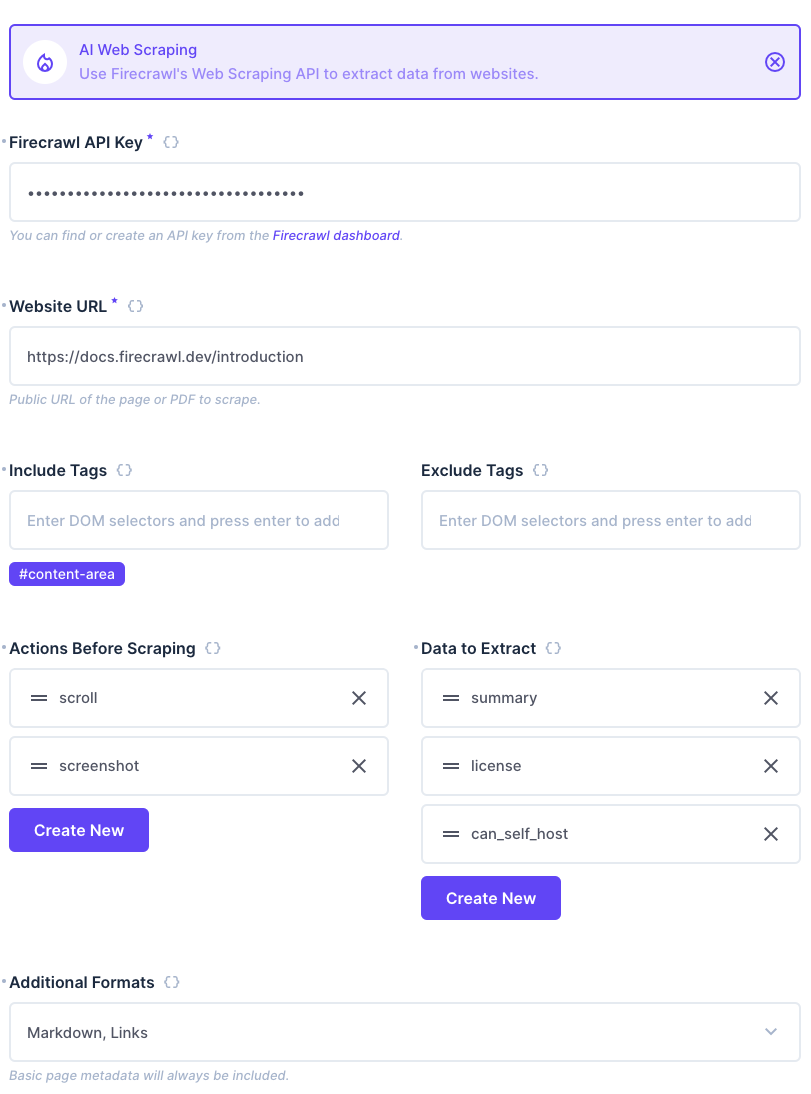
This flexible operation allows you to scrape websites and extract data using a variety of options. You must always provide an API Key and URL, and will always receive basic metadata in the response.
You may additionally provide the following options:
Include / Exclude Tags
These options allow you to control which HTML elements are included or excluded from the response when scraping web pages.
Actions Before Scraping
You can perform actions before scraping the website. Each action may have a number of options, which are defined in the options field as a JSON object. You do not need to define the type of action within the options, as it is set automatically based on the action you choose.
Data To Extract
You can extract specific data from the scraped website. Specify properties you want Firecrawl to extract, and their types (string, boolean, number, etc.), and the operation will extract the data and return it in the response. These keys will be returned in the response.
Formats
All requests using this operation will return metadata in the response. You may also request additional formats to be returned, such as markdown, html, and screenshot. If screenshot is requested, a link to the screenshot will be returned.
Output
The operation outputs a JSON object with the following structure:
{
  "extract": {
    "summary": "Firecrawl is an API service for crawling URLs and converting their content to clean data.",
    "license": "AGPL-3.0",
    "can_self_host": true
  },
  "actions": {
    "screenshots": [ "https://directlinktoimage.com/screenshot.png" ]
  },
  "metadata": {
    "title": "Quickstart | Firecrawl",
    "description": "Firecrawl allows you to turn entire websites into LLM-ready markdown",
    "language": "sen",
    "ogLocaleAlternate": [],
    "viewport": "width=device-width",
    "msapplication-config": "https://mintlify.s3-us-west-1.amazonaws.com/firecrawl/_generated/favicon/browserconfig.xml?v=3",
    "apple-mobile-web-app-title": "Firecrawl Docs",
    "application-name": "Firecrawl Docs",
    "msapplication-TileColor": "#000",
    "theme-color": "#ffffff",
    "charset": "utf-8",
    "og:type": "website",
    "og:site_name": "Firecrawl Docs",
    "twitter:card": "summary_large_image",
    "og:title": "Quickstart | Firecrawl",
    "twitter:title": "Firecrawl Docs",
    "og:image": "/images/og.png",
    "twitter:image": "/images/og.png",
    "og:description": "Firecrawl allows you to turn entire websites into LLM-ready markdown",
    "og:url": "https://docs.firecrawl.dev/introduction",
    "next-head-count": "25",
    "sourceURL": "https://docs.firecrawl.dev/introduction",
    "statusCode": 200
  }
}
Adding different formats will return additional data in the root object.