
Learn more about our ✨ new ✨ native MCP
Directus Logo
  • Use Cases and Features
    • Headless CMS
      Manage and deliver content with ease
    • Backend-as-a-Service
      Build and ship applications faster
    • Headless Commerce
      A single source of truth for products
    • 100+ More Use Cases
      Build anything (or everything)
    • Instant APIs
      Connect a database, get REST + GraphQL APIs
    • Granular Policy-Based Auth
      Provide secure, autonomous data access
    • Visual Automation Builder
      Automate content and data workflows with ease
    • 50+ More Features
      Get everything you need out-of-the-box
    Project Showcase
    Built With Directus

    Built With Directus

    See what everyone's been building with Directus

  • Learn More
    • Blog
      Read our latest articles and guides
    • Case Studies
      Case studies and success stories
    • Community
      Join our new community forum.
    • Agency Directory
      Browse our list of agency partners
    • About Us
      Learn more about Directus and the team
    • Wall of Love
      See what others are saying about us
    • Contact
      Have a general inquiry or question for us?
    • Support
      Reach out to Directus support
    Watch Directus TV
    Directus TV
    Video

    Directus TV

    Go down the rabbit hole with hours of original video content from our team.

  • Developers
  • Enterprise
  • Pricing
Book a DemoGet StartedLog In
Directus Marketplace
Marketplace
  1. Extensions
  2. Integrations
  3. Templates
Back to Extensions
interface

Address Completion Interface

Use Google Places autocomplete Data API as an Address Completion interface

Address Completion Interface for Directus

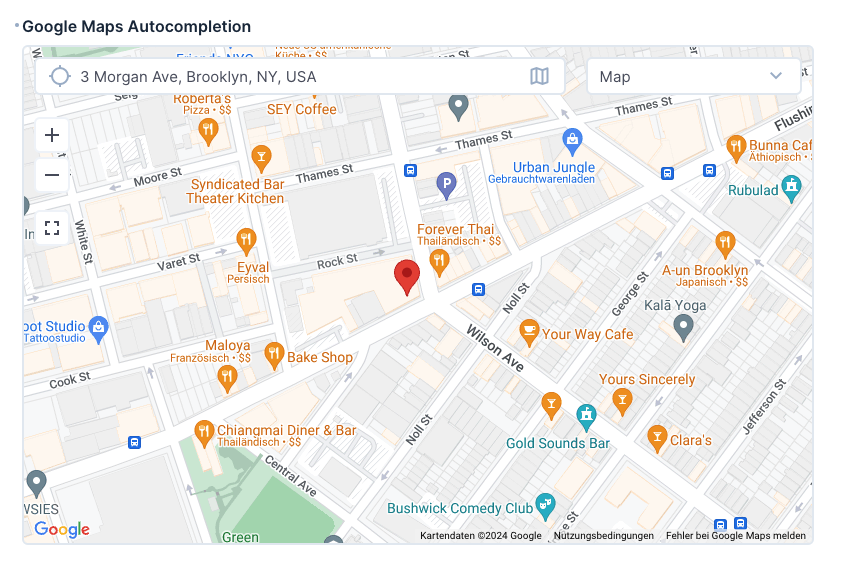
A Directus interface that integrates Google Maps address autocompletion functionality into the Directus Editor.

Features

  • Google Maps address autocompletion
  • Customizable autocompletion configuration
  • Display the result on a map (optionally)

Prerequisites

  • A Directus installation
  • Google Maps API key with appropriate permissions
  • Access to your Directus environment variables

Installation

To install the extension, take a look at the Official Guide.

Configuration

1. Environment Variables

Add the following environment variables to your config file, in order to allow the app to load data from the google-APIs:

CONTENT_SECURITY_POLICY_DIRECTIVES__SCRIPT_SRC=array:'self', 'unsafe-eval', https://*.googleapis.com
CONTENT_SECURITY_POLICY_DIRECTIVES__IMG_SRC=array:'self', data:, https://*.gstatic.com, https://*.googleapis.com

2. Google Maps API Setup

  1. Obtain a Google Maps API key from the Google Cloud Console. View Google documentation
  2. Enable the following APIs in your Google Cloud project:
    • Places API (New)
    • Maps JavaScript API

Recommended Security Measures:

  • Restrict the API key to your domain
  • Enable only the required services (Places API and Maps JavaScript API)

Interface Configuration
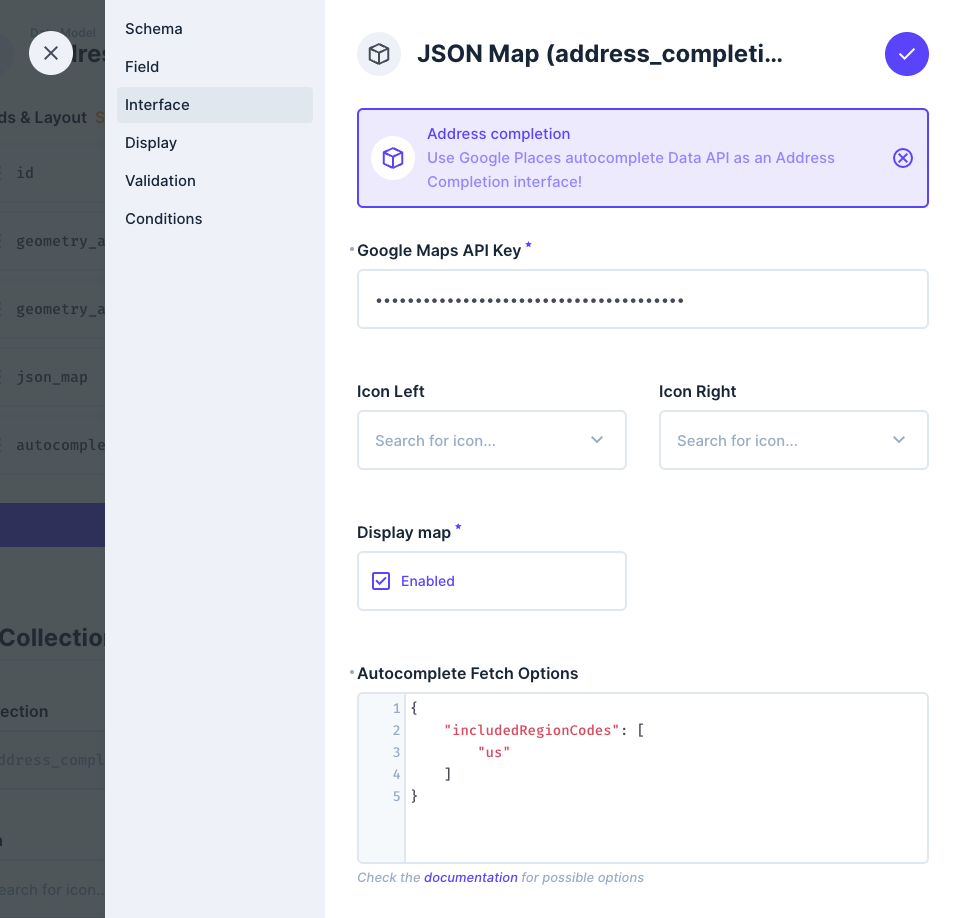
Autocomplete Settings

You can customize the autocomplete behavior using the interface settings. The configuration accepts standard Google Places Autocomplete parameters as documented in the Google Maps JavaScript API Reference.

Example Configuration:

{
    "includedRegionCodes": [
        "us"
    ]
}

This example restricts autocomplete results to US addresses only.

Support

For issues and feature requests, please use the GitHub issues section of this repository.

@directus-labs/address-completion-interface

npm i @directus-labs/address-completion-interface
This extension is sandboxed and can be installed through the Directus Marketplace. Learn more.
Kevin Lewis
Kevin Lewis
Verified
1.0.0
Works with v10.0.0+ or v11.0.0+
Updated 11 months ago
MIT License
72.1 KiB (5 files)
npm
  • Directus LogoDirectus Logo

    A composable backend to build your Headless CMS, BaaS, and more. 

  • Solutions
    • Headless CMS
    • Backend-as-a-Service
    • Product Information
    • 100+ Things to Build
  • Resources
    • Documentation
    • Guides
    • Community
    • Release Notes
  • Support
    • Issue Tracker
    • Feature Requests
    • Community Chat
    • Cloud Dashboard
  • Organization
    • About
    • Careers
    • Brand Assets
    • Contact
©2025 Monospace Inc
  • Cloud Policies
  • License
  • Terms
  • Privacy